路径操作高级配置
OpenAPI operationId
警告
如果您不是 OpenAPI 的“专家”,您可能不需要此功能。
您可以使用参数 operation_id 来设置将在您的路径操作中使用的 OpenAPI operationId。
您需要确保它对于每个操作都是唯一的。
from fastapi import FastAPI

app = FastAPI()


@app.get("/items/", operation_id="some_specific_id_you_define")
async def read_items():
    return [{"item_id": "Foo"}]
使用路径操作函数名作为 operationId
如果您想将 API 的函数名用作 operationId,您可以迭代所有函数,并使用它们的 APIRoute.name 来覆盖每个路径操作的 operation_id。
您应该在添加完所有路径操作之后执行此操作。
from fastapi import FastAPI
from fastapi.routing import APIRoute

app = FastAPI()


@app.get("/items/")
async def read_items():
    return [{"item_id": "Foo"}]


def use_route_names_as_operation_ids(app: FastAPI) -> None:
    """
    Simplify operation IDs so that generated API clients have simpler function
    names.

    Should be called only after all routes have been added.
    """
    for route in app.routes:
        if isinstance(route, APIRoute):
            route.operation_id = route.name  # in this case, 'read_items'


use_route_names_as_operation_ids(app)
提示
如果您手动调用 app.openapi(),您应该在此之前更新 operationId。
警告
如果您这样做,您必须确保您的每个路径操作函数都有一个唯一的名称。
即使它们位于不同的模块(Python 文件)中。
从 OpenAPI 中排除
要从生成的 OpenAPI schema(从而从自动文档系统中)中排除路径操作,请使用参数 include_in_schema 并将其设置为 False。
from fastapi import FastAPI

app = FastAPI()


@app.get("/items/", include_in_schema=False)
async def read_items():
    return [{"item_id": "Foo"}]
来自 docstring 的高级描述
您可以限制从路径操作函数的 docstring 中用于 OpenAPI 的行数。
添加一个 \f(一个转义的“换页符”字符)会导致 **FastAPI** 在此处截断用于 OpenAPI 的输出。
它不会出现在文档中,但其他工具(如 Sphinx)将能够使用其余内容。
from fastapi import FastAPI
from pydantic import BaseModel

app = FastAPI()


class Item(BaseModel):
    name: str
    description: str | None = None
    price: float
    tax: float | None = None
    tags: set[str] = set()


@app.post("/items/", response_model=Item, summary="Create an item")
async def create_item(item: Item):
    """
    Create an item with all the information:

    - **name**: each item must have a name
    - **description**: a long description
    - **price**: required
    - **tax**: if the item doesn't have tax, you can omit this
    - **tags**: a set of unique tag strings for this item
    \f
    :param item: User input.
    """
    return item
🤓 其他版本和变体
from typing import Union

from fastapi import FastAPI
from pydantic import BaseModel

app = FastAPI()


class Item(BaseModel):
    name: str
    description: Union[str, None] = None
    price: float
    tax: Union[float, None] = None
    tags: set[str] = set()


@app.post("/items/", response_model=Item, summary="Create an item")
async def create_item(item: Item):
    """
    Create an item with all the information:

    - **name**: each item must have a name
    - **description**: a long description
    - **price**: required
    - **tax**: if the item doesn't have tax, you can omit this
    - **tags**: a set of unique tag strings for this item
    \f
    :param item: User input.
    """
    return item
附加响应
您可能已经看到了如何为路径操作声明 response_model 和 status_code。
这定义了关于路径操作主响应的元数据。
您还可以使用它们的模型、状态码等来声明附加响应。
文档中有一个关于此的整个章节,您可以在 OpenAPI 中的附加响应 中阅读。
OpenAPI 扩展
当您在应用程序中声明一个路径操作时,**FastAPI** 会自动生成关于该路径操作的相关元数据,以便包含在 OpenAPI schema 中。
技术细节
在 OpenAPI 规范中,它被称为 Operation Object。
它包含有关路径操作的所有信息,并用于生成自动文档。
它包括 tags、parameters、requestBody、responses 等。
这个路径操作特定的 OpenAPI schema 通常由 **FastAPI** 自动生成,但您也可以对其进行扩展。
您可以使用参数 openapi_extra 来扩展路径操作的 OpenAPI schema。
OpenAPI 扩展
这个 openapi_extra 很有用,例如,它可以用于声明 OpenAPI 扩展。
from fastapi import FastAPI

app = FastAPI()


@app.get("/items/", openapi_extra={"x-aperture-labs-portal": "blue"})
async def read_items():
    return [{"item_id": "portal-gun"}]
如果您打开自动 API 文档,您的扩展将在特定路径操作的底部显示。
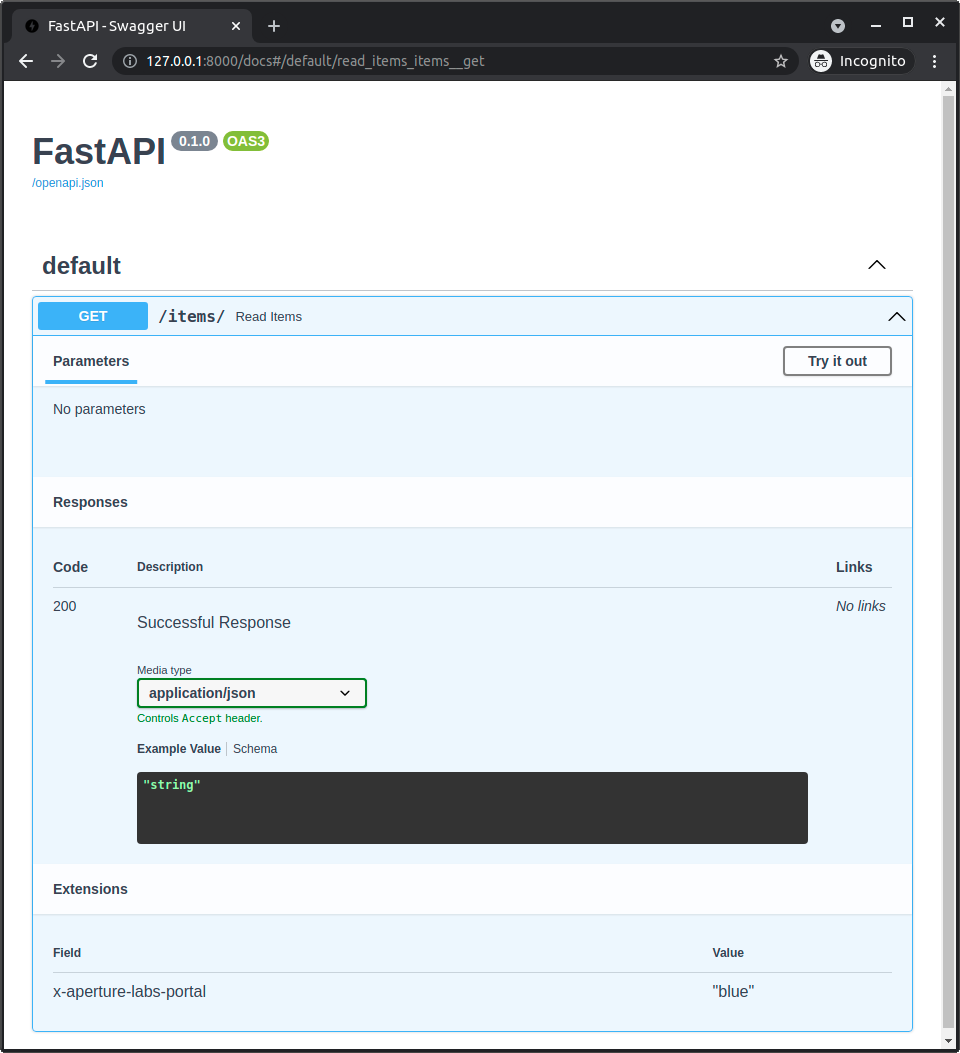
如果您查看生成的 OpenAPI (在您 API 的 /openapi.json),您也会在特定的路径操作中看到您的扩展。
{
    "openapi": "3.1.0",
    "info": {
        "title": "FastAPI",
        "version": "0.1.0"
    },
    "paths": {
        "/items/": {
            "get": {
                "summary": "Read Items",
                "operationId": "read_items_items__get",
                "responses": {
                    "200": {
                        "description": "Successful Response",
                        "content": {
                            "application/json": {
                                "schema": {}
                            }
                        }
                    }
                },
                "x-aperture-labs-portal": "blue"
            }
        }
    }
}
自定义 OpenAPI 路径操作 schema
openapi_extra 中的字典将与为路径操作自动生成的 OpenAPI schema 进行深度合并。
因此,您可以向自动生成的 schema 添加额外的数据。
例如,您可以决定使用自己的代码读取和验证请求,而不使用 FastAPI 和 Pydantic 的自动功能,但您仍然希望在 OpenAPI schema 中定义请求。
您可以使用 openapi_extra 来做到这一点。
from fastapi import FastAPI, Request

app = FastAPI()


def magic_data_reader(raw_body: bytes):
    return {
        "size": len(raw_body),
        "content": {
            "name": "Maaaagic",
            "price": 42,
            "description": "Just kiddin', no magic here. ✨",
        },
    }


@app.post(
    "/items/",
    openapi_extra={
        "requestBody": {
            "content": {
                "application/json": {
                    "schema": {
                        "required": ["name", "price"],
                        "type": "object",
                        "properties": {
                            "name": {"type": "string"},
                            "price": {"type": "number"},
                            "description": {"type": "string"},
                        },
                    }
                }
            },
            "required": True,
        },
    },
)
async def create_item(request: Request):
    raw_body = await request.body()
    data = magic_data_reader(raw_body)
    return data
在此示例中,我们没有声明任何 Pydantic 模型。事实上,请求体甚至没有被解析为 JSON,而是直接以 bytes 的形式读取,并且 magic_data_reader() 函数将负责以某种方式解析它。
尽管如此,我们仍然可以声明请求体的预期 schema。
自定义 OpenAPI 内容类型
使用相同的技巧,您可以 Pydantic 模型来定义 JSON Schema,然后该 JSON Schema 将包含在路径操作的自定义 OpenAPI schema 部分中。
即使请求中的数据类型不是 JSON,您也可以这样做。
例如,在此应用程序中,我们不使用 FastAPI 集成的功能来从 Pydantic 模型中提取 JSON Schema,也不使用 JSON 的自动验证。事实上,我们将请求内容类型声明为 YAML,而不是 JSON。
import yaml
from fastapi import FastAPI, HTTPException, Request
from pydantic import BaseModel, ValidationError

app = FastAPI()


class Item(BaseModel):
    name: str
    tags: list[str]


@app.post(
    "/items/",
    openapi_extra={
        "requestBody": {
            "content": {"application/x-yaml": {"schema": Item.model_json_schema()}},
            "required": True,
        },
    },
)
async def create_item(request: Request):
    raw_body = await request.body()
    try:
        data = yaml.safe_load(raw_body)
    except yaml.YAMLError:
        raise HTTPException(status_code=422, detail="Invalid YAML")
    try:
        item = Item.model_validate(data)
    except ValidationError as e:
        raise HTTPException(status_code=422, detail=e.errors(include_url=False))
    return item
尽管如此,虽然我们没有使用默认的集成功能,但我们仍然使用 Pydantic 模型来手动生成我们想要以 YAML 形式接收的数据的 JSON Schema。
然后我们直接使用请求,并将请求体提取为 bytes。这意味着 FastAPI 甚至不会尝试将请求 payload 解析为 JSON。
然后,在我们的代码中,我们直接解析该 YAML 内容,然后再次使用相同的 Pydantic 模型来验证 YAML 内容。
import yaml
from fastapi import FastAPI, HTTPException, Request
from pydantic import BaseModel, ValidationError

app = FastAPI()


class Item(BaseModel):
    name: str
    tags: list[str]


@app.post(
    "/items/",
    openapi_extra={
        "requestBody": {
            "content": {"application/x-yaml": {"schema": Item.model_json_schema()}},
            "required": True,
        },
    },
)
async def create_item(request: Request):
    raw_body = await request.body()
    try:
        data = yaml.safe_load(raw_body)
    except yaml.YAMLError:
        raise HTTPException(status_code=422, detail="Invalid YAML")
    try:
        item = Item.model_validate(data)
    except ValidationError as e:
        raise HTTPException(status_code=422, detail=e.errors(include_url=False))
    return item
提示
这里我们重用了同一个 Pydantic 模型。
但是,同样的方式,我们也可以以其他方式进行验证。